In a typical ASP.NET Web Forms application, incoming requests are mapped to physical files on disk. You can change this behaviour through the use of System.Web.Routing, which requires a little configuration within the application. ASP.NET Web Pages, on the other hand, provides support for routing out-of-the-box, although it is not as powerful as configuring your own through System.Web.Routing. Nevertheless, this in-built support is likely to be more than enough for managing friendly URLs for most sites.
First, what is meant by Friendly URLs? Take a look at the URLs on this site. This article can be found at http://www.mikesdotnetting.com/article/165/webmatrix-urls-urldata-and-routing. It should be clear to most people, just by reading the bold parts of the URL what they can expect to see if they requested it: an article on URLs, UrlData and Routing as pertaining to WebMatrix. A previous incarnation of this site would have presented the URL as http://www.mikesdotnetting.com/Article.aspx?ID=165. Not particularly meaningful... Over the years, a number of commentators have claimed that Google simply will not index URLs such as the one with the querystring. This is not true. My site was regularly indexed. However, you should be aware of this advice taken from Google's Webmaster Central guidelines:
If you decide to use dynamic pages (i.e., the URL contains a "?" character), be aware that not every search engine spider crawls dynamic pages as well as static pages. It helps to keep the parameters short and the number of them few.
Following that, is there any benefit to having key words appear in a friendlier URL? According to Google, the answer is Yes - it helps "a little bit". Of course, they won't say how much "a little bit" is.
OK. Now that we have got all that out of the way, how does Routing work with ASP.NET Web Pages? If you use Routing in ASP.NET Web Forms, or MVC, you can control how URLs map to resources with complete freedom. The built-in routing that comes with Web Pages offers a significant amount of freedom, but URLs must ultimately map to physical files on disk. That means you must have at least one file that matches part of the URL. Let's look at that in a bit more detail.
A URL is composed of a number of parts. The first is the domain. In the case of my site, that's http://www.mikesdotnetting.com. After that comes a backslash (/) followed by one or more segments, each containing data. There is no limit to the number of segments that a URL can contain. WebMatrix will initially take all the segments and attempt to match them to a file path. If no file is found, WebMatrix will start considering trailing segments to be part of UrlData, and attempts to match the remainder to a physical file. This sounds a little confusing, so an example should help.
Create a site with the following structure:
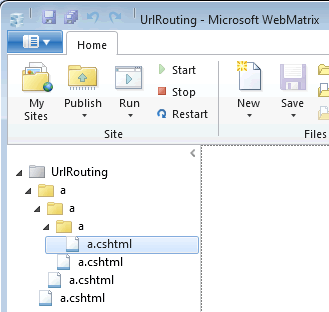
The site has a folder called 'a', inside of which is another folder called 'a', inside of which is a third folder called 'a'. Inside of each folder (including the root folder), there is a file called 'a.cshtml'. Each file contains a paragraph describing its location. For example, the file in the root folder contains this markup:
<p>Page A in Root folder</p>
The file in the third level folder contains this markup:
<p>File A in Folder A in Folder A in Folder A</p>
If you select this file in WebMatrix and click the Run button, the resulting URL in your browser should look something like this (although your port number will very likely be different):
http://localhost:6324/a/a/a/a.cshtml
That's what you would expect to have to request in order to run that particular page. Now remove the ".cshtml" from the URL so that it becomes http://localhost:6324/a/a/a/a. Request this new URL, and you should get the same page - File A in Folder A in Folder A in Folder A. the Web Pages framework looks at all the segments, and attempts to turn it into a path:
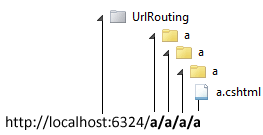
In this case, it's looking for a file named 'a' three folders deep from the root, with all three folders named 'a'. If you remove the last 'a' and make another request (http://localhost:6324/a/a/a), you should get the file named 'a' two folders deep. Now change the last letter in the URL to a 'b': http://localhost:6324/a/a/b. You should get a.cshtml in the first level folder named 'a'. But what happened to the 'b' on the end of the URL? Web Pages couldn't find a file named 'b' in the second level folder, so it assumed that 'b' is UrlData, and looked to match the remaining segments to a file path. If no matches are found during the search for files, Web Pages will attempt to locate a default document instead. The two default documents which work are default.cshtml and index.cshtml in that order. However, this search is performed once, and assumes that the URL is entirely a file path, and contains no UrlData.
UrlData
Essentially, UrlData behaves in a very similar way to a querystring, except that each value is located by position rather than being referenced by it's name. It is a way of passing arbitrary data via a URL. UrlData is populated to a List<string>, which can be iterated through - or you can reference items according to their numerical index (eg UrlData[0]). You can test this for yourself, by adding the following code to the deepest level 'a.cshtml' file:
<p>Total number of items in UrlData: @UrlData.Count</p>
<ul>
    @for(var i = 0; i < UrlData.Count; i++){
        <li>UrlData[@i]: @UrlData[i]</li>
    }
</ul>
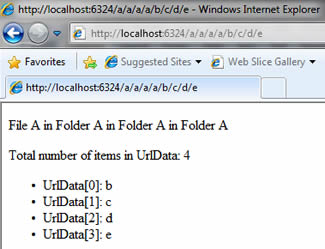
Now request the following URL: http://localhost:6324/a/a/a/a/b/c/d/e, and you should see that the page reports 4 items within the UrlData collection, which are iterated through and displayed according to their index in the collection:
When you reference items in the UrlData collection, you should treat them in the same way as any other user input. Just as you have manipulated the URL that you requested if you have been following along with the exercises, so a malicious user can manipulate the URL to attempt to inject something nasty into it. All the values are passed as strings, so you should use IsInt(), IsFloat() etc to test that values can be safely converted, and you should pass the resulting value as a parameter if you intend to use it as part of a database query. It is also worth pointing out that adding another backslash after the URL (http://localhost:6324/a/a/a/a/b/c/d/e/) will add another item to the UrlData collection, except that it will be empty.
Querystrings
Earlier, I said that UrlData behaves in a similar way to querystrings, but UrlData is not a querystring. Querystrings continue to work in exactly the same way as they do for any other framework: you append the URL with a question mark (?) followed by name/value pairs separated by ampersands (&). Going back to the deepest level 'a.cshtml' file, add the following code:
@foreach(string item in Request.QueryString){
    <p>QueryString item: name=@item, value=@Request[item]</p>
}
Now request the following URL:
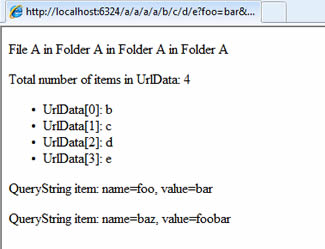
http://localhost:6324/a/a/a/a/b/c/d/e?foo=bar&baz=foobar
The new piece of code iterates over each item in the querystring and prints its name and value to the browser:
Summary
This article should help to explain how routing, UrlData and querystrings work with ASP.NET Web Pages. There are good reasons for using the routing system to generate friendly URLs, not least for usability and a little SEO juice. One final thing worth explaining is how my current URL structure (which is driven by ASP.NET MVC) would work with Web Pages. Simply, all you would have to do is create a file called Article.cshtml in the root folder of your site. The number and article title will be treated as two items in UrlData - the first (UrlData[0]) is the identifier for the article, and the second (UrlData[1]) is the title which has been treated to a little method which replaces spaces with hyphens (or dashes) and removes other extraneous punctuation which is not allowed in URLs.
