The Web Service methods that I will use revolve around cars. Having set up a web site in Visual Studio 2008, I have added a new item of type "Web Service" to the project, calling it CarService.asmx. The code-behind - CarService.cs - is automatically generated within the App_Code folder. The full code for that class file is as follows:
using System;
using System.Web;
using System.Web.Services;
using System.Web.Services.Protocols;
using System.Web.Script.Services;
using System.Collections.Generic;
using System.Linq;
public class Car
{
public string Make;
public string Model;
public int Year;
public int Doors;
public string Colour;
public float Price;
}
/// <summary>
/// Summary description for CarService
/// </summary>
[WebService(Namespace = "http://tempuri.org/")]
[WebServiceBinding(ConformsTo = WsiProfiles.BasicProfile1_1)]
[ScriptService]
public class CarService : WebService
{
List<Car> Cars = new List<Car>{
new Car{Make="Audi",Model="A4",Year=1995,Doors=5,Colour="Red",Price=2995f},
new Car{Make="Ford",Model="Focus",Year=2002,Doors=5,Colour="Black",Price=3250f},
new Car{Make="BMW",Model="5 Series",Year=2006,Doors=4,Colour="Grey",Price=24950f},
new Car{Make="Renault",Model="Laguna",Year=2000,Doors=5,Colour="Red",Price=3995f},
new Car{Make="Toyota",Model="Previa",Year=1998,Doors=5,Colour="Green",Price=2695f},
new Car{Make="Mini",Model="Cooper",Year=2005,Doors=2,Colour="Grey",Price=9850f},
new Car{Make="Mazda",Model="MX 5",Year=2003,Doors=2,Colour="Silver",Price=6995f},
new Car{Make="Ford",Model="Fiesta",Year=2004,Doors=3,Colour="Red",Price=3759f},
new Car{Make="Honda",Model="Accord",Year=1997,Doors=4,Colour="Silver",Price=1995f}
};
[WebMethod]
public List<Car> GetAllCars()
{
return Cars;
}
[WebMethod]
public List<Car> GetCarsByDoors(int doors)
{
var query = from c in Cars
where c.Doors == doors
select c;
return query.ToList();
}
}
A Car class is created at the top of the code, which has a number of properties of different types: strings, ints and floats. The Web Service itself is decorated with the [ScriptService] attribute, which denotes that the service can be called from Javascript. It also ensures that the data returned is a JSON string representing a single object or an array of objects, depending on the functionality of the service.
A List<Car> is instantiated, and populated with a number of Car objects. The syntax makes use of the object and collection intitialisers that were introduced in C# 3.0. Two simple methods are each decorated with the [WebMethod] attribute. The first one simply returns the List<Car> Cars that was created, whereas the second one makes use of LINQ to return only those Cars that have the number of doors that the method accepts as a parameter. There's nothing particularly fancy or clever in any of this, except to repeat the point that the [ScriptService] attribute is vital to making the methods usable by AJAX.
The mark-up in the aspx page that will call the Web Service is extremely simple:
<form id="form1" runat="server">
<input type="button" id="Button1" value="Get Cars" />
<div id="output"></div>
</form>
All that's needed now is some Javascript for the getCars() method that has been assigned to the onclick event of the html button. This will go into the <head> section of the page:
<script type="text/javascript" src="script/jquery-1.2.6.min.js"></script>
<script type="text/javascript">
$(function() {
$('#Button1').click(getCars);
});
function getCars() {
$.ajax({
type: "POST",
url: "CarService.asmx/GetAllCars",
data: "{}",
contentType: "application/json; charset=utf-8",
dataType: "json",
success: function(response) {
var cars = response.d;
$('#output').empty();
$.each(cars, function(index, car) {
$('#output').append('<p><strong>' + car.Make + ' ' +
car.Model + '</strong><br /> Year: ' +
car.Year + '<br />Doors: ' +
car.Doors + '<br />Colour: ' +
car.Colour + '<br />Price: £' +
car.Price + '</p>');
});
},
failure: function(msg) {
$('#output').text(msg);
}
});
}
</script>
First, jQuery is referenced via the src attribute of the first <script> tag. Then a click event is registered with the button which will invoke the getCars() function. After that is the getCars() function that is fired when the button is clicked. It makes use of the $.ajax(options) function within jQuery, and accepts an object with a number of optional properties. type specifies the HTTP method, which in this case is POST. url specifies the URL of the Web Service, together with the web method that is being called. This is followed by the parameters, which are applied to the data property. In this case, no parameters are being passed, as we are calling the method that retrieves the entire collection of Cars. The contentType and dataType MUST be specified. Following this are two further functions: success defines what should be done if the call is successful, and failure handles exceptions that are returned.
In this case, the success callback is passed the resulting HTTP response. response in this case looks like this in FireBug:
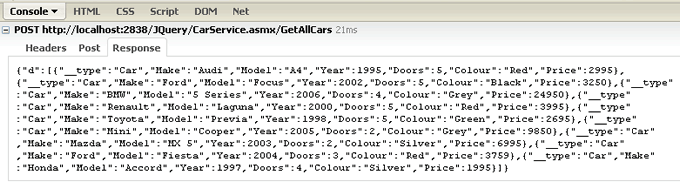
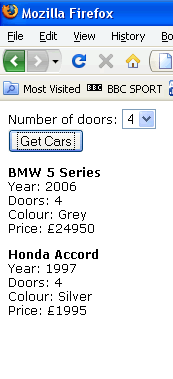
You can see that an object with a property - d - is returned, which contains an array of objects. Each object has a __type property which tells you that it is a Car object, followed by the other properties of our Web Service Car object. The div with the id of output is emptied, in case there was clutter there from a previous ajax call. The jQuery each() function is used to iterate over the collection of objects. Each car object is accessed in turn, and its properties are written to a paragraph, which is then appended to the content of div output. the result looks like this:

We'll add a DropDownList to the aspx file, so that we can make use of the second Web Method, which retrieves cars that meet the Number of Doors criteria:
<form id="form1" runat="server">
<div>
Number of doors:
<asp:DropDownList ID="ddlDoors" runat="server">
<asp:ListItem>2</asp:ListItem>
<asp:ListItem>3</asp:ListItem>
<asp:ListItem>4</asp:ListItem>
<asp:ListItem>5</asp:ListItem>
</asp:DropDownList>
</div>
<input type="button" id="Button1" value="Get Cars" onclick="getCars();" />
<div id="output"></div>
</form>
Only two lines in the previous Javascript need to be changed and these are shown in bold:
<script type="text/javascript" src="script/jquery-1.2.6.min.js"></script>
<script type="text/javascript">
function getCars() {
$.ajax({
type: "POST",
url: "CarService.asmx/GetCarsByDoors",
data: "{doors: " + $('#<%= ddlDoors.ClientID %>').val() + " }",
contentType: "application/json; charset=utf-8",
dataType: "json",
success: function(response) {
var cars = response.d;
$('#output').empty();
$.each(cars, function(index, car) {
$('#output').append('<p><strong>' + car.Make + ' ' +
car.Model + '</strong><br /> Year: ' +
car.Year + '<br />Doors: ' +
car.Doors + '<br />Colour: ' +
car.Colour + '<br />Price: £' +
car.Price + '</p>');
});
},
failure: function(msg) {
$('#output').text(msg);
}
});
}
</script>
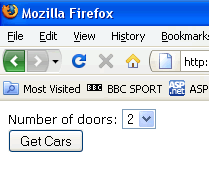
The url option now points to the appropriate method, and a parameter is passed into the data option, which uses jQuery syntax to reference the selected value from the DropDownList. I have used inline ASP.NET tags in this case to dynamically render the ID of the DropDownList using the ClientID property, so that there will be no issues in referencing the DropDownList if this code was transferred to a User Control or another control that implements INamingContainer. Now when the page is run, and an option selected, the button click event results in just those cars matching the number of doors in the DropDownList being returned: