iTextSharp - Working with Fonts
iTextSharp has built-in support for the 14 Type 1 fonts: Courier, Courier Bold, Courier Italic, Courier Bold and Italic, Helvetica, Helvetica Bold, Helvetica Italic, Helvetica Bold and Italic, Times Roman, Times Roman Bold, Times Roman Italic, Times Roman Bold and Italic, Symbol, ZapfDingBats®. Helvetica translates more or less to Windows Arial font, while Times Roman has an equivalent in Times New Roman. The default font is Helvetica, 12pt, black in the style typically known as Normal.
There are three principal ways to set the font to work with: one is to use the BaseFont.CreateFont() method, the second is to use the FontFactory.GetFont() method , and the third is to instantiate a new Font object. BaseFont.CreateFont() is a lot more limited, and only sets up the definition of a font. new Font() allows for propogation of font styles from one font to the next. FontFactory.GetFont() returns a valid and new Font object that you can work with directly. It also offers 14 overloaded constructors which gives you a lot more options to work with. For that reason, you are most likely going to use the FontFactory.GetFont() method. But we will get BaseFont.CreateFont() out of the way first.
BaseFont bfTimes = BaseFont.CreateFont(BaseFont.TIMES_ROMAN, BaseFont.CP1252, false);
Font times = new Font(bfTimes, 12, Font.ITALIC, Color.RED);
The above lines create a BaseFont object and uses the built-in constant values to set the font family and encoding. It also specifies false for embedding the font within the PDF document. this decreases the overall size of the document, but should be set to true if you are using fonts that are unlikely to be on the user's system, or if you plan to get the PDF printed professionally. A new Font object is created using the BaseFont object, and further setting the font size in points, the style and the colour - again, using iTextSharp's constants for these values. Now the font is put to use in a paragraph:
string path = Server.MapPath("PDFs");
Document doc = new Document();
PdfWriter.GetInstance(doc, new FileStream(path + "/Font.pdf", FileMode.Create));
doc.Open();
doc.Add(new Paragraph("This is a Red Font Test using Times Roman", times));
doc.Close();
And the result (if all goes well) is as follows:
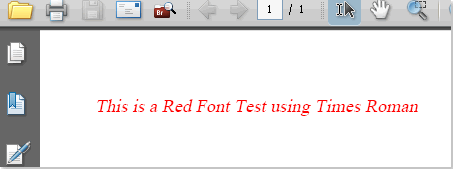
Now to the FontFactory.GetFont() method. This method has 14 (count 'em!) overloads that allow you to specify anything from font family, size, colour, style, embedding, encoding and caching in pretty much any combination you like. Each time that you call FontFactory.GetFont(), a new Font object is created. This method will work directly with all fonts registered by iTextSharp, which includes all fonts found in the Windows default font directory. On Win XP Pro, that's usually C:/WINDOWS/Fonts. If you want a list of all the registered fonts, the FontFactory.RegisteredFonts collection holds them. This can be useful if you want to find the exact name of each font.
int totalfonts = FontFactory.RegisterDirectory("C:\\WINDOWS\\Fonts");
StringBuilder sb = new StringBuilder();
foreach (string fontname in FontFactory.RegisteredFonts)
{
sb.Append(fontname + "\n");
}
doc.Add(new Paragraph("All Fonts:\n" + sb.ToString()));
Here's a variety of ways to use the GetFont() method:
Font arial = FontFactory.GetFont("Arial", 28, Color.GRAY);
Font verdana = FontFactory.GetFont("Verdana", 16, Font.BOLDITALIC, new Color(125, 88, 15));
Font palatino = FontFactory.GetFont(
"palatino linotype italique",
BaseFont.CP1252,
BaseFont.EMBEDDED,
10,
Font.ITALIC,
Color.GREEN
);
Font smallfont = FontFactory.GetFont("Arial", 7);
Font x = FontFactory.GetFont("nina fett");
x.Size = 10;
x.SetStyle("Italic");
x.SetColor(100, 50, 200);
As you can see, some of them use the iTextSharp Color object to set the colour using a constant, while others use the SetColor() method and pass in RGB values or create a new Color object passing in RGB values. Generally, they use a constant value for the font style, but you can pass in an int representing one of the values, or use the SetStyle() method passing in a string. There are also varying numbers of parameters passed, which ilustrates some of the different overloads available. Intellisense, Code Complete and the Object Browser will reveal the full panoply of options.
Registering Fonts
You may have a situation where you cannot install a font you want to use in the default font directory on the web server, so you have to register it explicitly with iTextSharp.
string fontpath = Server.MapPath(".");
BaseFont customfont = BaseFont.CreateFont(fontpath + "myspecial.ttf", BaseFont.CP1252, BaseFont.EMBEDDED);
Font font = new Font(customfont, 12);
string s = "My expensive custom font.";
doc.Add(new Paragraph(s, font));
You may notice that the above example is embedded in the PDF file (BaseFont.EMBEDDED), as your expensive font is unlikely to exist on users' operating systems.
Currently rated 4.54 by 13 people
Rate Now!
Date Posted:
15 October 2008 22:07
Last Updated:
16 April 2009 21:02
Posted by:
Mikesdotnetting
Total Views to date:
10621
Printer Friendly Version
Comments
20 February 2009 22:51 from Mikesdotnetting
@Janak,
If all you want to do is, say, reduce the font to 10pt, something like FontFactory.GetFont(FontFactory.HELVETICA, 10) will do you.
03 August 2009 10:21 from Ali
Nice article.. help me a lot. I have a question that can i create a pdf with right to left language like URDU. when i write urdu text in paragraph then it creates empty pdf. so can u help me to incorporate my task. Thanks
11 August 2009 13:56 from Mihai
how can I set a default font for the entire document and only in special cases use different fonts?
21 September 2009 12:51 from manoj
not satisfy with the answer of my question so kindly send me full code if possible at my mail Id
21 September 2009 13:05 from Mikesdotnetting
@manoj
If my article doesn't answer your "question" satisfactorily, how can I possibly know what code will help you?
16 October 2009 12:03 from Arin
Hello,
I am using ITextSharp to parse html to PDF. But the problem it didn't take any fonts within HTML. For example; suppose the following code snippet is my html
<span style="font-family: comic sans ms; font-size: 20px; color: #FF0000;">Hello its Arin. </span><span style="font-family: verdana; font-size: 20px; color: #FF0000;">Its a Test HTML page.</span>
now if you parse this...you will get the PDF without the font style.
Please let me know if you have any idea.
17 October 2009 08:45 from Mikesdotnetting
@Arin
iTextSharp is not very good with HTMl, as I am sure you have discovered. You will need to set up your own styles within the PDF using iTextSharp's StyleSheet classes.
28 October 2009 13:53 from helpful?
Great articles, thanks! How about foward/backward links throughout the series, just so we don't miss any?
06 November 2009 14:52 from PRa
@Arin - have you found the solution to this? I have the exact same problem, the font sizes and other html formatting are coming through in the pdf but not font styles.. I checked that link provided but that StyleSheet() only describes adding definitions for tags like body, span, but I have multiple span tags and they each can have different font style definitions..
11 November 2009 00:05 from Peter
Hello Mike, Thank you for the great articles. One question, is it possible to select a different font for each cell in a table? And if so, how? :) thanks again.
11 November 2009 20:49 from Mikesdotnetting
@Peter
Yes it's possible. This article shows how:
http://www.mikesdotnetting.com/Article/86/iTextSharp-Introducing-Tables
02 January 2010 12:20 from Kjetil Myhre
Thanks for your great examples, which I use extensively to create my own PDFs. :) I notice that you are using color constants and create RGB-colors. I'm currently trying out CMYK-based colors, but I can't seem to get them to work properly. For instance I am unable to get the font color black. It just becomes a darkish kind of gray. For black I've tried both CMYK(0,0,0,100) and CMYK(100,100,100,100), but none of them gives black. I also try a a few different shades of blue, but they are nowhere near the real deal which I pick from http://kuler.adobe.com/#create/fromacolor (an excellent color tool, for those unfamiliar with it) Do you have any experience with iTextSharp and CMYK colors?
31 January 2010 23:52 from jen
Hi,
Do you know how to apply fonts when using pdfstamper and a fillable pdf template?
I've tried applying font to the OverContent as well as setting field properties of "textfont" but it all seems to be being ignored.
Unfortunately all the font samples seem to involve adding paragraphs and chunks :(
Thanks!!
01 February 2010 10:39 from chary
HI Mikes,
thanks for the article.
Am having one problem in pdf conversion using itextsharp. bullets are not displaying properly, which is in html encoded text and HTMLWorker.ParseToList to partse. It is using Wingdlings font and is not coming proper in pdf. Is there a workaround for this issue.
Thanks
25 February 2010 03:45 from Ryan
A couple tips for writing Japanese text from code. Hope this helps ppl from bashing their heads into keyboard.
1) MS-Gothic is found on most windows computers with default installation. You don't need to download any special true type font files if you don't want to.
//here is the font object
Font fMSGothic = FontFactory.GetFont("MS-PGothic", BaseFont.IDENTITY_H, 8);
//using baseic Document and PdfWriter objects
table.AddCell(new Phrase("名字", fMSGothic));
//using PdfStamper and AcroFields objects
//filePath = location of template with fields to populate
//newFilePath = location to save new file with fields populated.
PdfReader reader = new PdfReader(filePath);
PdfStamper stamper = new PdfStamper(reader, new FileStream( newFilePath, FileMode.Create));
AcroFields fields = stamper.AcroFields;
foreach (DictionaryEntry de in fields.Fields)
{
string name = de.Key.ToString();
string data = "名字";
fields.SetFieldProperty(name, "textfont", fMSGothic.BaseFont, null);
fields.SetField(name, data);
}


20 February 2009 10:23 from janak
How can I change the Default Font Size?
Presently in my Project if I am not set font for Paragraph
then it will automatically take Arial Font Size 12.
How Can I change the size of Default Font?