The WebGrid helper is designed for rendering data taken from a database or provided via some other means. It has built-in support for paging and sorting (although a bug in the Beta 1 prevents you sorting on null DateTime values), and also offers access to a number of other formatting and design configurations. The main constructor (method called to create a WebGrid object) takes a number of arguments (mostly optional) as follows:
| IEnumerable<object> source | The data that the grid will display |
| [Optional, Default Value(null)] IEnumerable<string> columnNames | The values that you want to appear as column headers. |
| [Optional, Default Value(null)] string defaultSort | The column that you want to have the grid sorted on by default |
| [Optional, Default Value(10)] int rowsPerPage | The number of rows you want per page |
| [Optional, Default Value(true)] bool canPage | If this is true (it is by default) the grid can be paged |
| [Optional, Default Value(true)] bool canSort | If this is true (it is by default) the grid can be sorted |
| [Optional, Default Value(null)] string ajaxUpdateContainerId | The id of the containing element for Ajax paging and sorting support |
| [Optional, Default Value(null)] string fieldNamePrefix | A value which prefixes the default querystring fields such as "sort" and "sortdir" |
| [Optional, Default Value(null)] string pageFieldName | A custom value to replace the default querystring "page" field |
| [Optional, Default Value(null)] string selectionFieldName | A custom value to replace the default querystring "row" field |
| [Optional, Default Value(null)] string sortFieldName | A custom value to replace the default querystring "sort" field |
| [Optional, Default Value(null)] string sortDirectionFieldName | A custom value to replace the default querystring "sortdir" field |
The first argument, source is not optional. The grid must have some data to display. This can be any IEnumerable
I'm going to use the simple Books.sdf file I created for previous articles to show a basic implementation of the WebGrid using some of these arguments. To start with, this example shows a WebGrid being built using the minimum amount of code. Two things are required - the creation of a valid WebGrid object with a source of data, and a call to the WebGrid.GetHtml() method to write the resulting table to the browser:
@{
    var db = Database.Open("Books");
    var sql = "Select BookId, Title, ISBN, Description, FirstName, LastName, Category, DatePublished  " +
               "From Books Inner Join Authors on Books.AuthorId = Authors.AuthorId " +
               "Inner Join Categories on Books.CategoryId = Categories.CategoryId";
    var books = db.Query(sql);
    var grid = new WebGrid(books);
}

    @grid.GetHtml()
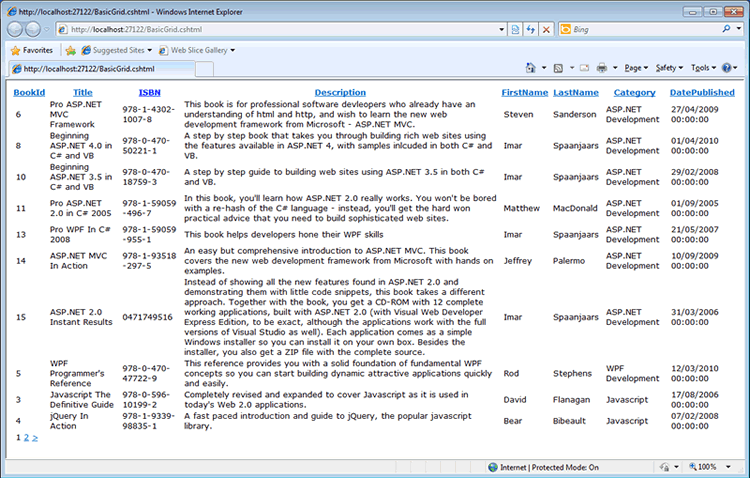
When rendered, you can see that the default behaviour is for all columns of data to be included in the grid, and for paging and sorting to be enabled with 10 rows per page:
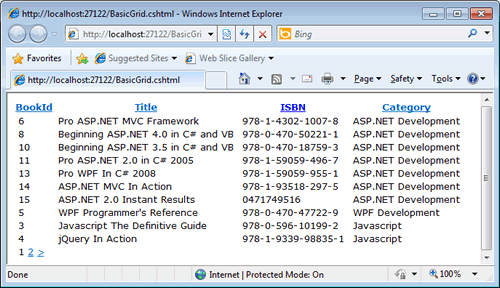
Limiting the columns can be done through the columnNames argument. This just needs to be included in the constructor with an IEnumerable of strings (an array will do):
@{
    var db = Database.Open("Books");
    var sql = "Select BookId, Title, ISBN, Description, FirstName, LastName, Category, DatePublished  " +
               "From Books Inner Join Authors on Books.AuthorId = Authors.AuthorId " +
               "Inner Join Categories on Books.CategoryId = Categories.CategoryId";
    var books = db.Query(sql);
    var grid = new WebGrid(books, columnNames : new []{"BookId", "Title", "ISBN", "Category"});
}

    @grid.GetHtml()
Now it's time to look at another argument - the ajaxUpdateContainerId. This points to the container element that will provide partial updates via jQuery AJAX. To start with, we'll amend the previous code to include two items - a paragraph showing the current time, and a div for the grid:
@{
    Layout = "~/Shared/_Layout.cshtml";
    var db = Database.Open("Books");
    var sql = "Select BookId, Title, ISBN, Description, FirstName, LastName, Category, DatePublished  " +
               "From Books Inner Join Authors on Books.AuthorId = Authors.AuthorId " +
               "Inner Join Categories on Books.CategoryId = Categories.CategoryId";
    var books = db.Query(sql);
    var columns = new []{"BookId", "Title", "ISBN", "Category"};
    var grid = new WebGrid(books, columnNames : columns);
}
<p>The time is @DateTime.Now </p>
<div id="grid">
    @grid.GetHtml()
</div>
Now, if you run the page and click one of the pager links, or a sorting link, you will see that the time changes, indicating that the whole page refreshes to display the new page of data or the re-sorted grid. The div with the id of "grid" will be the ajaxUpdateContainer, so that needs to be passed into the constructor. But there is one other thing to do, and that is to obtain the jquery library and make it available to the page. You can download jQuery from here: http://jquery.com/. Choose the compressed and minified version as it's the smallest for downloading to the browser. My sample so far has used a Layout page, which contains the <head> element. This is where the reference to the jQuery library needs to be made. So I add the downloaded file to a new folder called Scripts, and add the following to the head element:
<head>
    <title></title>
    <link href="@Href("~/Styles/StyleSheet.css")" rel="stylesheet" type="text/css" />
    <script type="text/javascript" src="@Href("~/Scripts/jquery-1.4.4.min.js")"></script>
</head>
The contructor for the grid needs to be changed. In the example below, I have moved the code that creates an array for the columns outside of the grid constructor to save having to wrap it for display on my web site but I have also passed the id of the div to the ajaxUpdateContainerId parameter:
@{
    Layout = "~/Shared/_Layout.cshtml";
    var db = Database.Open("Books");
    var sql = "Select BookId, Title, ISBN, Description, FirstName, LastName, Category, DatePublished  " +
               "From Books Inner Join Authors on Books.AuthorId = Authors.AuthorId " +
               "Inner Join Categories on Books.CategoryId = Categories.CategoryId";
    var books = db.Query(sql);
    var columns = new []{"BookId", "Title", "ISBN", "Category"};
    var grid = new WebGrid(books, columnNames : columns, ajaxUpdateContainerId: "grid");
}
<p>The time is @DateTime.Now </p>
<div id="grid">
    @grid.GetHtml()
</div>
Now if you run the page and click the sorting or paging links, you see that the time does not change. The only thing that changes is the contents of the div.
If you don't want to allow sorting or paging, you need to pass false for the canPage or the canSort arguments:
var grid = new WebGrid(books, canSort : false, columnNames : columns, ajaxUpdateContainerId: "grid");
This results in a plain table of data and no sorting links.
So far, we have only looked at passing configuration data into the WebGrid constructor. Now we'll have a look at the optional arguments that the WebGrid.GetHtml() method takes:
| [Optional, Default Value(null)] string tableStyle | CSS style for the table |
| [Optional, Default Value(null)] string headerStyle | CSS style for the header |
| [Optional, Default Value(null)] string footerStyle | CSS style for the footer |
| [Optional, Default Value(null)] string rowStyle | CSS style for rows |
| [Optional, Default Value(null)] string alternatingRowStyle | CSS style for alternating rows. |
| [Optional, Default Value(null)] string selectedRowStyle | CSS style for selected row |
| [Optional, Default Value(true)] bool displayHeader | Whether to display the table header or not |
| [Optional, Default Value(false)] bool fillEmptyRows | If the number of rows on the current page is less than the rowsPerPage, empty rows are created if this is true. |
| [Optional, Default Value(null)] string defaultCellValue | The value for empty cells. By default, it's " " |
| [Optional, Default Value(null)] IEnumerable<WebGridColumn> columns | Columns to be included |
| [Optional, Default Value(null)] IEnumerable<string> exclusions | Columns to be excluded |
| [Optional, Default Value(3)] WebGridPagerModes mode | Pager display options |
| [Optional, Default Value(null)] string firstText | Replace the default << link for the first page |
| [Optional, Default Value(null)] string previousText | Replace the default > link for the next page |
| [Optional, Default Value(null)] string nextText | Replace the default > link for the next page |
| [Optional, Default Value(null)] string lastText | Replace the default >> link for the last page |
| [Optional, Default Value(5)] int numericLinksCount | Set the number of numeric links in the pager |
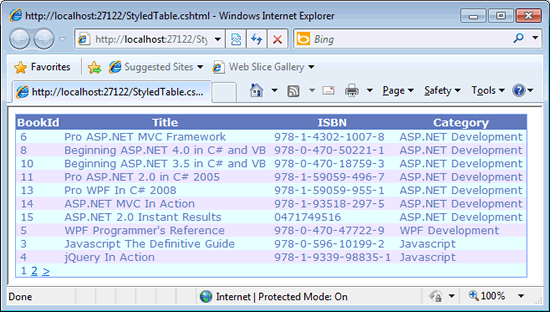
The first options all cover styling the table and its contents. Here's some css styles that illustrate this:
.table{
    border : 1px solid #809FFF;
    background-color: #E6FFFF;
    color:  #6078BF;
    border-collapse: collapse;
}

.header{
    background-color: #6078BF;
    color: white;
}

.alternate{
    background-color: #EEE6FF;
}
Now if we apply these to the GetHtml method:
@grid.GetHtml(
    tableStyle : "table",
    alternatingRowStyle : "alternate",
     headerStyle : "header"
)
we can see the result like this:
Now it's time to look at columns. Ideally, you would have some control over which columns of data are returned by the SQL query, but this may not always be the case, so you need some way of switching columns off. Or you might want one query to run, but to be able to determine which columns can be seen based on the current roles of the user. If you haven't set the columns for display in the constructor, you can do so here, either by specifying columns to include through the columns parameter, or by specifying which ones not to display through exclusions. The optional arguments for the column constructor are as follows:
| [Optional, Default Value(null)] string columnName | The column name |
| [Optional, Default Value(null)] string header | Header text if you don't want database field names |
| [Optional, Default Value(null) Func<object, object> format | Formatting to be applied to values |
| [Optional, Default Value(null)] string style | CSS styles to be applied to the content |
| [Optional, Default Value(true)] bool canSort | Switches sorting off when set to false |
To illustrate these at work, here's some more code followed by an image showing the result:
@grid.GetHtml(
    columns: grid.Columns(
        grid.Column(
            columnName : "BookId",
            header : "Id",
            canSort : false,
            style : "disabled"),
        grid.Column(
            columnName : "Title"),
        grid.Column(
            columnName : "Category"),
        grid.Column(
            columnName : "DatePublished",
            format: @<text>@item.DatePublished.ToShortDateString()</text>)

    )
)
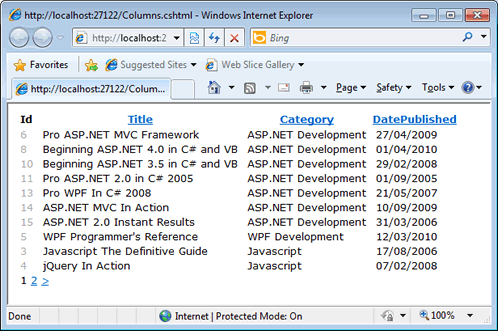
Looking at the rendered grid you can see that only the columns specified have been included in the grid. Further, the BookId column has a new name, Id, and cannot be sorted on. To help give users a visual clue that this is read-only, the column has a CSS class applied which displays the values as a light grey colour. In addition, the DatePublished column has been formatted so that the DateTimes do not include the hours, minutes and seconds.
If you would like to play with the sample code presented in this article, this download includes a number of pages showing the concepts presented here together with a copy of the simple database used.
