To begin with, I'll start by reviewing the flow of execution when a request comes into a typical ASP.NET MVC site. When IIS receives a request, it passes the request to ASP.NET, based on the url, or more specifically, the file extension. With IIS 7 in integrated mode (the default), all requests are mapped to ASP.NET, while with IIS 6, you can set up a wildcard mapping to cause this to happen too.
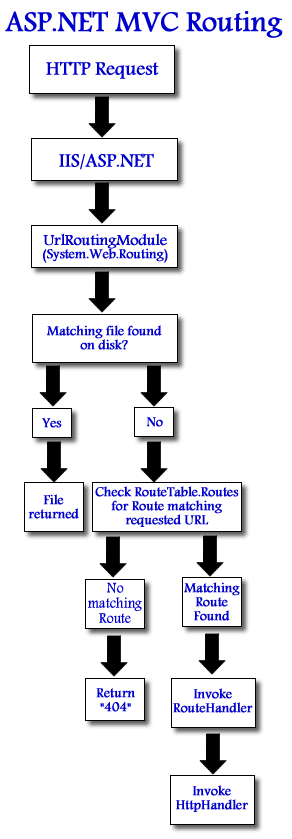
The first component that gets invoked within an ASP.NET MVC application is UrlRoutingModule which is in fact part of System.Web.Routing. Its job is to first check the incoming url to see if there is a matching file on disk. If there is, it passes the request back to IIS to serve the file directly. If there is no matching file on disk, the module gets to work by examining its RouteCollection structure to determine where to send the request next. It will invoke the RouteHandler associated with the matching route's entry (MvcRouteHandler by default), which in turn invokes the appropriate HttpHandler to process the remaining logic associated with the request. Again, by default, this will be MvcHandler. With image files, which do exist in a subfolder somewhere within the application, the core routing module doesn't get that far as control is passed back to IIS prior to a RouteHandler being invoked.
Usually, the fact that ASP.NET bails out of processing requests for static files is desirable behaviour. However, if you want to perform some logic prior to serving these types of requests, you need to get involved programmatically at some point. You could get round the default behaviour for static files by setting RouteTable.Routes.RouteExistingFiles = true. Phil Haack (Senior Program Manager for ASP.NET MVC) rightly describes this as the "nuclear option" in that every file - css, js, doc, pdf, xml etc will have to be handled by Routing. So the key to this is to ensure that requests for static files do not match existing files on disk, which will force the routing module to perform its lookup against the RouteTable (and then invoke a RouteHandler etc). This is simple to do, just by ensuring that your <img> elements reference a fictitious directory. For example, if your images are located in a subfolder called "images", img tags that reference a "graphics" folder will not find existing matching files.
Having done this, the next steps are to:
- Register a Route for image file requests
- Create a RouteHandler to handle those requests
- Create an HttpHandler to process the actual requests
We'll start with Step 2. There's not much point in starting with Step 1 - if you try to register a route and specify a custom RouteHandler for that Route without creating one first, you will not be able to compile.
The RouteHandler is simple. It has to implement IRouteHandler, which only specifies one method - IHttpHandler IRouteHandler.GetHttpHandler(RequestContext requestContext):
public class ImageRouteHandler : IRouteHandler
{
  public IHttpHandler GetHttpHandler(RequestContext requestContext)
  {
    return new ImageHandler(requestContext);
  }
}
Moving quickly on to the actual HttpHandler - ImageHandler that this method returns:
public class ImageHandler : IHttpHandler
{
  public ImageHandler(RequestContext context)
  {
    ProcessRequest(context);
  }

  private static void ProcessRequest(RequestContext requestContext)
  {
    var response = requestContext.HttpContext.Response;
    var request = requestContext.HttpContext.Request;
    var server = requestContext.HttpContext.Server;
    var validRequestFile = requestContext.RouteData.Values["filename"].ToString();
    const string invalidRequestFile = "thief.gif";
    var path = server.MapPath("~/graphics/");

    response.Clear();
    response.ContentType = GetContentType(request.Url.ToString());

    if (request.ServerVariables["HTTP_REFERER"] != null &&
        request.ServerVariables["HTTP_REFERER"].Contains("mikesdotnetting.com"))
    {
      response.TransmitFile(path + validRequestFile);
    }
    else
    {
      response.TransmitFile(path + invalidRequestFile);
    }
    response.End();
  }

  private static string GetContentType(string url)
  {
    switch (Path.GetExtension(url))
    {
      case ".gif":
        return "Image/gif";
      case ".jpg":
        return "Image/jpeg";
      case ".png":
        return "Image/png";
      default:
        break;
    }
    return null;
  }

  public void ProcessRequest(HttpContext context)
  {
  }

  public bool IsReusable
  {
    get { return false; }
  }
}
At the bottom are the two methods that the IHttpHandler interface insists are implemented. The first of these, public void ProcessRequest(HttpContext context) is ignored. With an MVC application, we pass in a RequestContext object, not an HttpContext object, so an overload is provided that is MVC friendly, and it is this overload that does all the work. It is called within the ImageHandler's class constructor. In this case, ProcessRequest checks to see if my domain is part of the referer (which it should be if the image request is being made from a page in my site, and not someone else's site). If it isn't, I am returning an alternative image in the response. What you decide to return is up to you. I have seen all sorts of things returned by other people, including replacement images containing "nudies", or a simple 1 pixel transparent gif, or a plain and simple "404 Not Found".
There are other actions you could take at this point. For example, it may be that you are happy for Google to index your images, so you might want to check to see if the referer contains "images.google". You may also want to log the referer if the condition fails, indicating a potential leecher.
Now we need to register the requests for images in the RouteTable, and to indicate that ImageRouteHandler should take care of them. In global.asax, this is added:
routes.Add("ImagesRoute",
                 new Route("images/{filename}", new ImageRouteHandler()));
Hopefully, not only should this article have helped you to protect against image leeching, but should also have given you enough of the basics behind ASP.NET MVC Routing so that you can extend it as you need for other purposes.
