Lazy Loading jQuery Tabs with ASP.NET
Lazy Loading is a well-known design pattern that is intended to prevent redundant processing within your application. In the case of tabbed data, there seems little point retrieving and binding data that appears in a tabbed area that no one looks at. So, this examples covers how to defer data access and display until the user wants it - which is defined by them clicking the relevant tab.
I'm going to use the same Web Service as was introduced in one of my previous jQuery articles, but I have added a new method to it which simply returns a collection of Cars that meet the Make criteria passed into the method argument:
[WebMethod]
public List<Car> GetCarsByMake(string make)
{
var query = from c in Cars
where c.Make == make
select c;
return query.ToList();
}
First we make sure that the correct Javascript files are referenced:
<script type="text/javascript" src="script/jquery-1.3.2.min.js"></script>
<script type="text/javascript" src="script/ui.core.min.js"></script>
<script type="text/javascript" src="script/ui.tabs.min.js"></script>
Then the next thing to do is to add some HMTL to the page to act as tabs:
<form id="form1" runat="server">
<div>
<div id="content">
<ul>
<li><a href="#tab0"><span>Ford</span></a></li>
<li><a href="#tab1"><span>Toyota</span></a></li>
<li><a href="#tab2"><span>Honda</span></a></li>
<li><a href="#tab3"><span>Audi</span></a></li>
</ul>
<div id="tab0"></div>
<div id="tab1"></div>
<div id="tab2"></div>
<div id="tab3"></div>
</div>
</div>
</form>
An essential part of the deal is CSS. I borrowed some for this example from Klaus Hartl, the originator of jQuery tabs who has used CSS Sprites, which he explains here. If you want to short cut like me, the CSS is available on the demo page which will be linked to later.
The HTML requires a container for the tabs, a bit like the ASP.NET AJAX TabPanel. In this example, it's the div with the id of content. The tabs themselves are represented by anchor tags within list items. The content for each tab is placed in a div. Once the CSS has been applied, creating a tabbed interface requires (as is usual with jQuery) just a line or two of Javascript:
$(function() {
var $tabs = $("#content").tabs();
});
Running the page as it is gives this result:
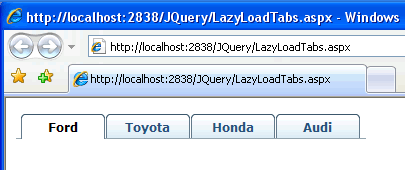
However, at the moment, nothing happens when the tabs are clicked. Some more Javascript is needed, and this will be focused on one of the options that can be used when specifying the element to act as a tab container - the select event. When a tab is clicked, we need to retrieve data relating to the Make of car that the tab represents. The data retrieval will be performed by AJAX. The following code shows how the initial Javascript is embellished to register an event handler on the click of a tab, and the method that gets called to obtain the data:
var make;
$(function() {
var $tabs = $("#content").tabs({
select: function(e, ui) {
var thistab = ui.index;
$("#tab" + thistab).html(getCars(thistab));
}
});
});
function getCars(thistab) {
switch (thistab) {
case 0:
make = "Ford";
break;
case 1:
make = "Toyota";
break;
case 2:
make = "Honda";
break;
case 3:
make = "Audi";
break;
}
$.ajax({
type: "POST",
url: "Services/CarService.asmx/GetCarsByMake",
data: "{make: '" + make + "'}",
contentType: "application/json; charset=utf-8",
dataType: "json",
success: function(response) {
var cars = (typeof response.d) == 'string' ? eval('(' + response.d + ')') : response.d;
for (var i = 0; i < cars.length; i++) {
$('#tab' + thistab).append('<p><strong>' + cars[i].Make + ' ' +
cars[i].Model + '</strong><br /> Year: ' +
cars[i].Year + '<br />Doors: ' +
cars[i].Doors + '<br />Colour: ' +
cars[i].Colour + '<br />Mileage: ' +
cars[i].Mileage + '<br />Price: £' +
cars[i].Price + '</p>');
}
}
});
}
Once the tabs are created, a callback is applied to the select (or tab click) event, which takes two arguments - the event object and a ui object. The ui object exposes a property called index, which holds the zero-based index of the tab that was clicked. This is used t0 identify the tab. It's also passed into the function that gets the data so that the right Make can be passed to the web service - once it has been run through a switch statement. Otherwise the getCars() method follows an almost identical pattern to previous calls to web services that I have covered.
Running the page and clicking on the tabs shows that this works just fine, except that every time that a tab is clicked, the data is fetched anew.
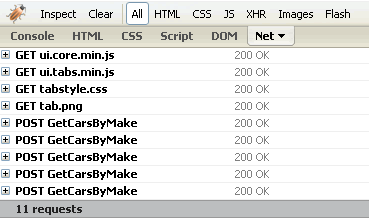
What's need is a way to keep track of which tabs have been clicked to prevent unnecessary requests being made when they are clicked again. The modifications that achieve this are shown in bold:
var make;
var clicked = new Array();
$(function() {
var $tabs = $("#content").tabs({
select: function(e, ui) {
var thistab = ui.index;
$("#tab" + thistab).html(getCars(thistab));
}
});
});
function getCars(thistab) {
for (var x in clicked) {
if (clicked[x] == thistab)
return;
}
switch (thistab) {
case 0:
make = "Ford";
break;
case 1:
make = "Toyota";
break;
case 2:
make = "Honda";
break;
case 3:
make = "Audi";
break;
}
$.ajax({
type: "POST",
url: "Services/CarService.asmx/GetCarsByMake",
data: "{make: '" + make + "'}",
contentType: "application/json; charset=utf-8",
dataType: "json",
success: function(response) {
var cars = (typeof response.d) == 'string' ? eval('(' + response.d + ')') : response.d;
for (var i = 0; i < cars.length; i++) {
$('#tab' + thistab).append('<p><strong>' + cars[i].Make + ' ' +
cars[i].Model + '</strong><br /> Year: ' +
cars[i].Year + '<br />Doors: ' +
cars[i].Doors + '<br />Colour: ' +
cars[i].Colour + '<br />Mileage: ' +
cars[i].Mileage + '<br />Price: £' +
cars[i].Price + '</p>');
}
clicked.push(thistab);
}
});
}
An array is created to store the index of the tab that has been clicked. At the beginning of the getCars() method, a check is made to see if the tab that has been clicked is already in the array. If it is, the request is aborted by the use of the return statement. If not, the data is obtained, and finally the tab index is added to the array, thus ensuring that when it is clicked again, data is not retrieved.
Currently rated 4.13 by 119 people
Rate Now!
Date Posted:
02 March 2009 07:30
Last Updated:
14 July 2009 21:59
Posted by:
Mikesdotnetting
Total Views to date:
96065


Comments
10 March 2009 09:52 from Sin
Mike, why it is not getting an Aborted error when running in IE with this jquery-1.3.2.min.js?
11 March 2009 07:31 from Mikesdotnetting
@Sin
Why should it? Sorry, but I've got no idea what you are asking.
03 April 2009 04:51 from Jack
Quite cool, it will improve the performance showing in YSlow
03 April 2009 18:00 from Colm
Well done Mike, excellent article. I've been meaning to look into something like this - namely to lazy load on collapsible widgets, i.e. load the widgets as collapsed initially and only load data when the widget is expanded. Looks like it should be easy to extend what you've done to achieve this. Thanks!
21 April 2009 19:44 from Vijay
Very good article. I like the last part of the article to prevent multiple requests when clicked on the same tab again and again. Thanks Mike.
21 April 2009 19:48 from Boris
Mike it's very nice! (Borat Accent)
Is there a place I can D/L the code?
Thanks,
Boris
21 April 2009 20:36 from Mikesdotnetting
@Boris
All the code you need is in the article. I included every line. Ctrl + C, then Ctrl + V.
:o)
22 April 2009 01:33 from Ashish
Mike, wouldn't it be slightly easier and efficient, if you would just check if the Tab contents are null or empty. If you have a waiting gif in your tab, you could simply check if the gif exists. This would get away from creating an array and looping through the array.
22 April 2009 06:54 from Schooltje
Nice code, but I have another issue for tabs.... can you also directly navigate to tabx.
For example if you paste #tab3 into the querystring automatically tab3 is shown?
Thanks
22 April 2009 08:20 from Ashokan
Your code not working for me
Send me your source files of demo project
22 April 2009 09:01 from Mikesdotnetting
@Ashish
Easier and more efficient? Don't know about that, but otherwise your suggestions are good ones.
22 April 2009 09:06 from Mikesdotnetting
@Schooltje
Here's an easy sample for what you need: http://getrentwiz.com/blog/jquery-tab-select-from-url/
22 April 2009 09:07 from Mikesdotnetting
@Ashokan
My code works for me. See it working in the Demo page? The code in the article is identical and complete.
22 April 2009 12:51 from Hans Kruse
What about using $('#'+tabid).load(...) and having the service returning partial html.
You then also eliminate both the case statement and the eval statement.
If you really must use json then the $('#'+tabid).getJSON(function(){/*parse json and stick in right tab*/})
IMHO using the $.ajax(...) call is a bit overkill and complicates your article.
[a bit off-topic]
We use $(...).load in production software to make a combobox options selectable depending on the selected item of another combobox. That works fine. As a "Service" we have an "aspx" page that depending on the path after the .aspx (in rest style) gives an html snippet or json. it defaults to JSON e.g:
MySvc.aspx/html/[guid]
MySvc.aspx/json/[guid]
MySvc.aspx/[guid] (defaults to json)
Using WCF from jquery would probably be the utimate solution but that is still a skill on my wishlist to master.
[/a bit off-topic]
22 April 2009 20:55 from Mikesdotnetting
@Hans
All good suggestions - thanks. Using an aspx page to generate the html to be returned to an xmlhttprequest is something that I have done many times in the past. With classic ASP, using a .asp page was pretty much the only way to do this.
07 August 2009 09:28 from msony
Why dont use ajax request build in ui tabs? :-/
http://jqueryui.com/demos/tabs/#ajax
07 August 2009 17:48 from Mikesdotnetting
@msony
Huh? Did you read my article?
17 October 2009 19:45 from linxon
Great articel! I have very little JQuery knowledge but I was able to understand the code easily thanks to your clear and concise explanation thanks.
26 October 2009 14:08 from greg
Great article. Question, this may be my great duh for the week, but what tool are you using to monitor the html requests. Its the screen shot w/ the bug in top left.
26 October 2009 20:35 from Mikesdotnetting
@greg
That's a good question. I show screen shots of that tool in action so many times that I forget to mention it each time. It's the Firebug add-on that works with the FireFox browser.
https://addons.mozilla.org/en-US/firefox/addon/1843
05 November 2009 14:44 from Chris
I must be blind, but where is the link to your demo page?
20 November 2009 04:54 from prads
Great article mike helped me learn how to call webservices using jquery .... I had 2 questions
Isn't Lazy Loading already existing in tabs UI ?
To prevent reloads can't we use the Cache Option ?
21 November 2009 09:37 from Mikesdotnetting
@prads
Yes, there is a cache option will does away with the need for the array. Thanks for pointing that out.
29 December 2009 22:37 from Dan
Mike,
Great writeup.
Quick question : To make this work with ASP.NET MVC
Can I place an html.actionlink () into your code without
breaking something ?
<ul>
<li><a href="#tab0"><span>Ford</span></a></li>
* I would stick the actionlink in the above line which takes me to the FORD detail.aspx view
</ul>
Did you use the JQUERY UI for this example ?
Thanks in advance.
30 December 2009 05:55 from Mikesdotnetting
@Dan
Yes, and yes.
03 January 2010 15:19 from Abhishek
I don't think this is a good example to be used in commercial apps. Binding data from client side and exposing the webservices in javascript is not something I would do. I am looking for an example where I can load a user control dynamically. ATM, I am loading the entire set of tabs and toggling through css on click which is not elegant either. I need a better solution which is viable commercially. However, a good article !
03 January 2010 16:11 from Mikesdotnetting
@Abhishek
It may not be useful to you in your commercial apps, but that doesn't mean it can't be used by others in their commercial apps. Why wouldn't you want to expose web services? And if you have a good reason not to, why not use handlers or page methods?
24 June 2010 07:51 from Krokonoster
This one got me looking into the right direction, thanks Mike.
However, it turns out even simpler than you wrote here, using jQuery UI Tabs.
My list are just a bunch of ActionLinks pointing to ActionMethods that return Partial Views.
And the only javascript I then really need is : $("#tabContainer").tabs();
(See http://jquery.krokonoster.com/ for a example, and download the source code there)